
Table of contents
Your load test passed. Is your application getting slower?


Last updated on
Friday
October
2026
Your checkout API has a p95 target of 500 ms. Two months ago it answered in 220 ms. Today it answers in 350 ms. Every load test in between passed, every pipeline stayed green, and the API is now 59% slower.
That is a performance regression, and pass/fail thresholds are not designed to catch it. A threshold tells you whether the system is still acceptable. It does not tell you whether the system is getting worse.
This article explains how to detect regressions continuously and act on them: what counts as a regression, how to build a baseline you can trust, which signals to track, the three layers of detection, how to wire it all into CI/CD with Gatling, and what to do when a gate turns red.
What counts as a performance regression
A performance regression is a repeatable deterioration in latency, throughput, reliability or resource efficiency, measured against a valid reference under comparable conditions. The key word is relative. A system can meet every SLO and still regress.
Illustrative figures, collected at the same load in the same environment. With a 500 ms p95 SLO, this run passes. It has also lost more than half of its latency headroom.
Catching this requires two kinds of evaluation:
- Absolute thresholds: does the system still meet its SLOs, for example p95 below 500 ms and errors below 1%?
- Relative thresholds: has performance degraded materially compared with a stable baseline, even though the SLO still passes?
The reverse also holds. A single p99 spike is not automatically a regression. It can be normal run-to-run variation, a noisy neighbor, too few samples, or a saturated load generator. Before you can call something a regression, you need to know what normal looks like.
Noise is the real enemy: build a baseline you can trust
Most "regressions" that waste engineering time are noise. MongoDB's first automated system flagged any change above 10% against previous runs. Its false-positive rate reached 99%, because different tests have different noise levels and no single threshold fits them all. Fix the experiment before you tune the detector.
Measure your noise first. Run the same build against itself 5 to 10 times. Record the spread of p95, p99, throughput and error rate for each critical transaction. If a test naturally varies by 8%, it cannot reliably gate on a 3% change.
Version the baseline, not a memory of a good run. A baseline is only useful if you can prove a later run is comparable. Store this context with every reference run:
Keep two references: a fixed release baseline, promoted deliberately, and a history of comparable runs for trends. Never auto-promote the last passing build. Accept 3% degradation ten times in a row and you have shipped a 34% regression with every run looking fine next to its predecessor.
Pick the right injection model. Most internet-facing systems are open: users arrive whether or not the system is slow. Model them with Gatling's open injection (constantUsersPerSec, rampUsersPerSec). A closed model slows its own arrival rate when the system slows down, which hides exactly the degradation you are trying to find.
Check the load generator before blaming the application. A saturated injector produces fake latency. Monitor generator CPU and network on every run, and treat a run with an unhealthy generator as invalid, not as a regression.
Decide what you measure during warm-up. Excluding ramp-up gives cleaner steady-state comparisons. If users experience cold starts after a deployment or scale-out, test cold start separately rather than silently discarding it.
The signals that reveal regressions
Gate on tail percentiles, useful throughput and errors, never on the average alone. Google's four golden signals (latency, traffic, errors, saturation) are the right foundation. Regression analysis needs a bit more granularity:
Two details make these numbers trustworthy. First, a p99 needs volume: from 1,000 requests it rests on about 10 observations. Second, look at successful and failed request latency separately. Gatling's percentiles-over-time chart, for example, plots successful requests only, so timeouts don't distort it, and failures are reported in their own metrics.
Three layers of detection
No single check catches every regression. Mature teams stack three layers, each covering what the previous one misses.
Layer 1: absolute SLO gates
Encode your SLOs as pass/fail criteria on every run: p95 below 500 ms, errors below 1% at target load. These gates are simple, explainable and instant, which makes them ideal for CI. Their blind spot is everything that degrades while staying under the limit.
Layer 2: comparison against a baseline
Compare each run with the fixed baseline at equivalent load. For latency, the relative change is:
A policy might flag a 10% or 15% p95 increase on a critical transaction for investigation. There is no universal percentage. Calibrate it to the noise you measured, and confirm with repeated runs before you block: a single run against a single run in a noisy environment produces mostly false alarms. For stronger evidence, compare per-run summaries across 3 to 5 runs per side using a non-parametric test such as Mann-Whitney U or a bootstrap confidence interval, and require a minimum effect size so trivial differences don't fire.
Layer 3: trend and change-point analysis
The slowest regressions are invisible between two consecutive runs. Plotting every run as a point in a time series reveals drift: when it began, how fast it grows, and which commit range lines up with it. Change-point detection automates this by finding where the distribution of a series shifts. DataStax built its open-source detector, Hunter (now Apache Otava), and evaluated it on 15 months of results from a daily Gatling test. The trade-off is delay: change-point methods need several runs after a shift, and around 30 points of history, before they can confirm it.
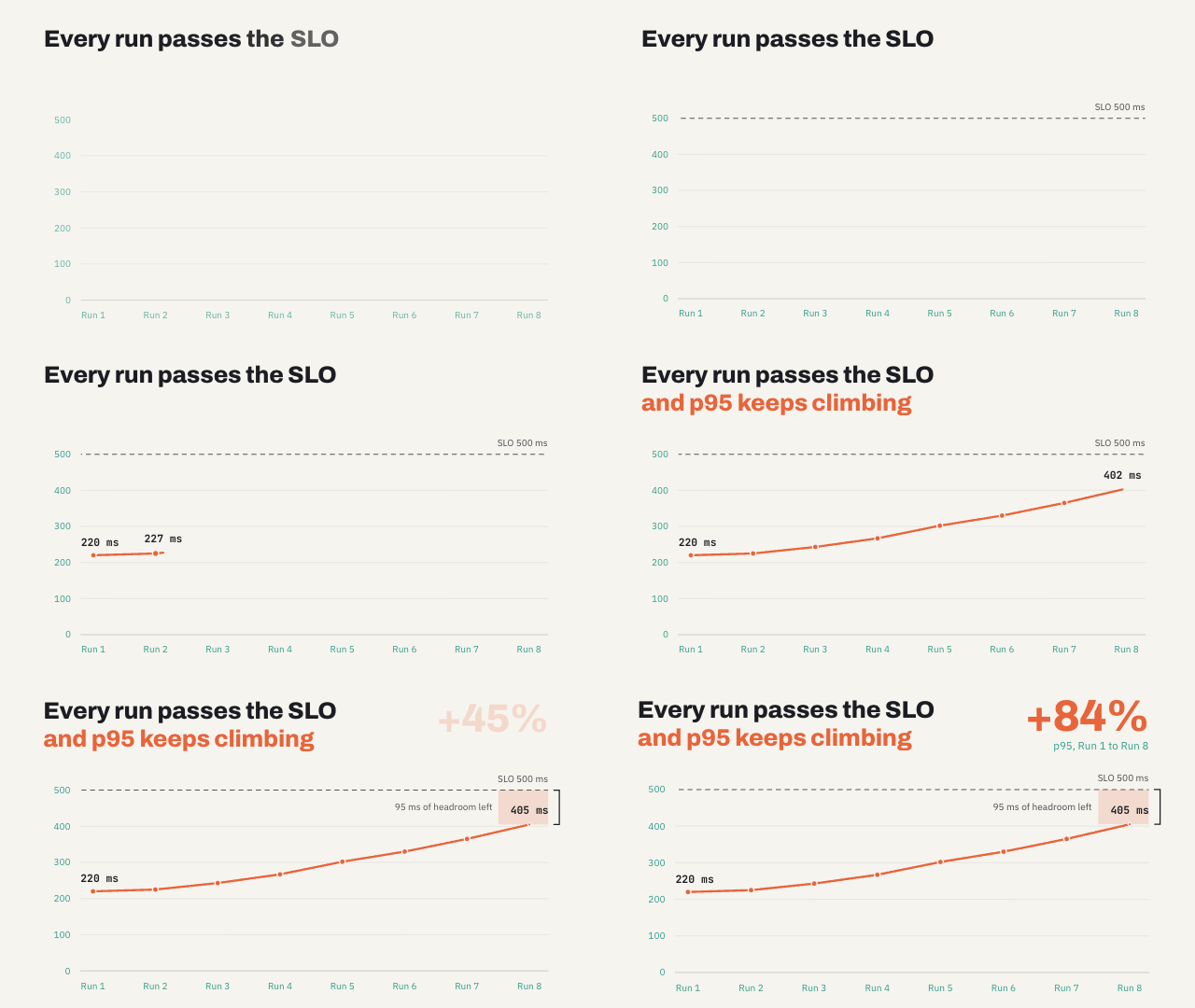
A two-run comparison sees at most 40 ms between neighbors. The trend shows a service that has lost most of its headroom.
Putting it into CI/CD with Gatling
Regression detection only works if it runs without anyone remembering to start it. With Gatling, the gate lives in the same repository as the application code, reviewed in pull requests like any other code.
Assertions: the absolute gate in code
This JavaScript simulation drives an open workload and fails if global p95 exceeds 500 ms, errors exceed 1%, or checkout p99 exceeds 1,500 ms:
setUp(
  scn.injectOpen(
    rampUsersPerSec(10).to(200).during(120),
    constantUsersPerSec(200).during(600)
  )
).assertions(
  global().responseTime().percentile(95).lt(500),
  global().failedRequests().percent().lt(1.0),
  details("Checkout").responseTime().percentile(99).lt(1500)
);
Gatling evaluates assertions after the run. If any one fails, the simulation fails, and the Maven, Gradle, sbt or npm build fails with it. Scopes are global, forAll (every request) and details (one request or group), so you can hold the checkout journey to a stricter bar than the rest of the traffic.
Assertions check absolute thresholds. Detecting a relative regression additionally requires comparing the run with a baseline, which is where Gatling Enterprise Edition comes in.
Gatling Enterprise Edition: SLOs, guardrails and comparisons
- SLOs are evaluated continuously over the run and reported as the percentage of time the condition held (green at 99% or more, orange from 90% to 99%, red below 90%). When SLOs are configured on a test, they replace code assertions for that run.
- Ramp exclusion removes ramp-up and ramp-down windows from SLO and assertion calculations, so warm-up noise doesn't skew the verdict.
- Stop criteria end a run early when mean generator CPU, global error ratio or a global response-time percentile crosses a threshold over a timeframe. A broken build stops burning credits, and a saturated injector can't record fake latency.
- CI/CD plugins for GitHub Actions, GitLab CI, Jenkins, Azure DevOps, Bamboo and TeamCity follow one pattern: trigger the simulation, wait, and pass or fail the pipeline on the result. Output includes the run ID, report URL and assertion results as JSON. Cancelling the pipeline cancels the run.
- Run Trends shows the last 10 runs of a test side by side: OK/KO responses, percentiles from p50 to p99.9999, and throughput.
- Run Comparison overlays up to 5 runs across 11 metrics with percentage deviation per request against a reference run.
- AI Trend Analysis and AI Run Comparison read those runs and return findings, recommendations and a verdict (Similar, Some Discrepancies or Divergent) with a confidence level. Treat them as triage aids that tell you where to look, not as proof.
Tikamoon runs a frozen, versioned pre-release scenario before every production deployment and uses Run Comparison to check the new version against the previous one at the same traffic mix. A regression blocks the release until it is resolved. Their rule: "No Gatling run, no production. It's not a suggestion. It's a rule."
Match test frequency to test cost
Each test must run long enough to support its conclusion. A five-minute PR test will not find a memory leak that a soak test exposes after six hours.
From what to why: investigating the root cause
A load test tells you what the application experienced. Observability data tells you why. Start with the failing business scenario, confirm the experiment was valid, then narrow down to individual requests and their dependencies.
These patterns tell you where to start. None of them proves causality on its own: reverting or isolating the suspect change and rerunning the same workload does.
To connect the two views, tag telemetry with a shared run ID and build ID. Gatling Enterprise Edition sends load-test metrics to Datadog, Dynatrace, New Relic, InfluxDB and any OpenTelemetry-compatible backend, so load charts and APM traces cover the same time window. InPost correlates Gatling's RPS, error and latency charts with Dynatrace and OpenTelemetry. A pre-production run exposed an unexpected 2x jump in requests per second, traced to an unnecessary HTTP-to-HTTPS redirect on an internal path, and fixed before it reached users.
Acting on a regression
Agree on the response before the first gate turns red. Not every regression should block a release, but every confirmed one needs an owner and a decision.
Once a regression is confirmed, close the loop:
- Detect: a gate, comparison or trend flags a candidate regression.
- Validate: check workload, generator health, data and environment parity, then rerun.
- Investigate: scope the affected transactions and load levels, bisect the commit range, correlate with traces and profiles.
- Fix or revert: revert when the impact is large and no quick fix exists; fix forward when the cause is understood; switch a feature flag off to contain a flagged change.
- Retest: rerun the exact workload that caught the problem. A lighter test that passes proves nothing. Add a soak or stress run if the cause was a leak or saturation.
- Prevent recurrence: keep the scenario and its acceptance criteria in the suite so the same regression fails the next build.
If a slowdown is intentional, such as a new security check, accept it explicitly: record the rationale, update the baseline and budgets, and annotate the trend so the detector stops flagging it. Silent re-baselining is how drift becomes normal.
Pitfalls to avoid
- Gating on averages. The mean stays flat while p99 doubles.
- One global threshold for every test. Noisy tests over-alert, quiet tests under-alert.
- Comparing only with the previous build. Slow erosion passes every comparison. Keep a fixed release baseline too.
- Closed models for open systems. The test slows down with the application and hides the problem.
- Uncontrolled environments. Shared staging, a growing database or a saturated injector create regressions that don't exist.
- Ignoring resource regressions. Flat latency at 20% more CPU per request is a capacity and cost regression.
- Detection without ownership. Alerts nobody owns train teams to ignore them.
Start here
You don't need a change-point algorithm on day one. You need a repeatable experiment:
- Pick the 3 to 5 most business-critical transactions and define their p95, error and throughput SLOs.
- Version the simulation, workload, dataset and environment alongside the application.
- Run the same build 5 to 10 times to measure natural variation.
- Promote a fixed baseline and store every run with its build and environment metadata.
- Add assertions or SLOs to every pipeline run, and stop criteria to discard invalid runs.
- Compare merges against the baseline and review trends nightly.
- Write down the block, conditional and accept rules, and who owns each decision.
If an unchanged application can't reproduce its own results, tighter gates will only automate noise. Once it can, every run becomes evidence: what changed, by how much, and whether it matters.
A green pipeline answers one question: is the application still acceptable? Continuous performance testing answers the one that protects production: is it getting slower? Start with Gatling Community Edition to put assertions in your pipeline today, or try Gatling Enterprise Edition to add SLOs, Run Trends, Run Comparison and AI-assisted analysis.
{{card}}
About the author
FAQ
FAQ
What is a performance regression?
A performance regression is a repeatable deterioration in latency, throughput, error rate or resource efficiency compared with a valid baseline under comparable conditions. A system can still meet its SLOs and be regressing.
How do you detect performance regressions in load testing?
Combine three layers: absolute SLO assertions on every run, comparison against a fixed, versioned baseline at equivalent load, and trend or change-point analysis across run history to catch slow drift.
What percentage change counts as a performance regression?
There is no universal threshold. Measure run-to-run noise by running the same build several times, then set a tolerance above it, often 10 to 15% on critical p95 latency, and confirm with repeated runs before blocking a release.
How does Gatling help catch performance regressions?
Gatling assertions fail the build when thresholds are breached. Gatling Enterprise Edition adds SLOs, stop criteria, CI/CD plugins, Run Trends across the last 10 runs, Run Comparison of up to 5 runs, and AI-assisted trend and comparison analysis.
Related articles
.png)

Ready to move beyond local tests?
Start building a performance strategy that scales with your business.
Need technical references and tutorials?
Minimal features, for local use only
