
Hey, I'm Aim

your new performance assistant

Get started

Hi, I'm Aim

I help you check your testing maturity, plan a test strategy, set realistic SLOs, choose a load injection shape, set up a testing campaign, or find the right tool for your stack

Tell me what you're working on

AI for Performance

Code-first, AI-first.

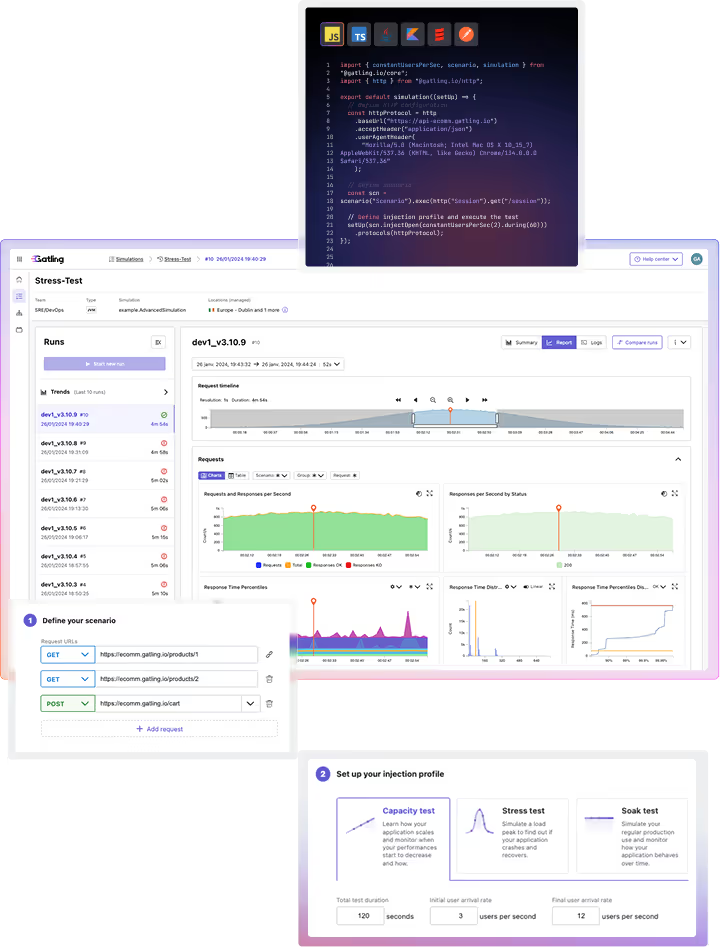
Because everything is code, Gatling handles AI systems the same way it handles everything else. It writes your tests, runs them against real systems, and tells you what happened, all in the workflow you already use.
Used by the most modern teams
AdobeCanal+Circle KCoincheckDesjardinsDWP BANKInpostHMHSNCF ConnectNickelSoneparSopra SteriaAdobeCanal+Circle KCoincheckDesjardinsDWP BANKInpostHMHSNCF ConnectNickelSoneparSopra Steria
AI-native by design, not by add-on

Test-as-code is winning the AI race.

AI reads and writes real code, not a proprietary binary file or a recorded UI flow.
AI is making test-as-code itself easier to write, closing the gap even further.

Real code, not a black box
AI reads and writes Gatling like any other file in your repo, no proprietary format to parse.
Open by design
Full visibility into how Gatling works benefits both your team and the AI helping them.
Native MCP server
Create, run, and analyze tests directly from Cursor, Claude Code, or any MCP-compatible assistant, covering your full test lifecycle: teams, packages, source repos, and runs.
No UI to get stuck on
Unlike NeoLoad or LoadRunner, there's no recorded flow or binary project file for AI to guess at.
Stack Overflow · August 2026
The most documented solution online
(history that feeds LLMs)

Gatling is the #1 solution mentioned on Stack Overflow among enterprise load testing tools.

Peec AI · July 2026 · n=267 AI answers
The most cited solution by LLMs for AI load testing

Tied #1 with Apache JMeter, but Gatling leads on average answer position (2.6 vs 5.5), meaning it's usually named first.

Powering LLM-based apps & AI-native workloads

Test AI systems the way they behave in production

AI-powered applications don't fail the way traditional APIs do. They're slow on purpose, they hold state, every call costs money, and a lot of them run over long-lived streaming connections. Most load testing tools were built for a different shape of problem. Gatling was built for this one.

Simulate realistic LLM traffic: streaming responses, stateful interactions, and long-running requests using SSE and WebSocket
Anticipate scale and cost risks by testing how concurrency and request duration behave under load
Test AI features as part of your system, alongside APIs, databases, and downstream services, not in isolation

The result: you ship AI applications that hold up in production, and you find out what they cost before your users do.


JavaScriptTypeScriptJavaKotlinScala
ScenarioBuilder llmStreaming = scenario("LLM Streaming (SSE)").exec(
  sse("Stream chat completion")
    .post("/chat/completions")
    .header("Authorization", "Bearer " + apiKey)
    .body(StringBody("""
      {
        "model": "claude-sonnet-5",
        "stream": true,
        "messages": [{ "role": "user", "content": "..." }]
      }
    """))
  ).asLongAs(session -> !session.contains("done")).on(
    sse.processUnmatchedMessages((messages, session) ->
      messages.stream().anyMatch(m -> m.message().contains("message_stop"))
        ? session.set("done", true)
        : session
    )
  ),
  sse("close").close()
);

You can use Gatling to understand how LLMs behave under load. Here is a benchmark we did on Anthropic models on speed & cost for short, medium & long prompts.

Learn more from our LLM benchmark
Claude Haiku 4.5Claude Sonnet 5Claude Opus 4.8
Throughput (tokens/sec) by model, long prompts, under concurrent load
Our Vision

The first autonomous load tester agent

Teams don't skip load testing because they stopped caring about performance. They skip it because writing the tests is slow, reading the results takes a specialist, and every API change breaks what they already wrote. We're building an autonomous load testing agent, brick by brick, and those three are where we started.

  github.com/acme/checkout-service
export async function handleChatCompletion(req, res) {
  const client = getPool({ max: 10 });
  const result = await client.query(sql, params);
  return res.json(result.rows);
}
Gatling Agent scanning changed code...
Detected: modified query path in handleChatCompletion. Generating a targeted load scenario.
✓ Generated ChatCompletionSimulation.java
http("Chat completion").post("/api/v1/chat")
  .check(status().is(200))
  .check(responseTimeInMillis().lt(500));
⚠ Regression detected
P95 latency +340ms vs. baseline. Root cause traced to the connection pool change in this commit.
💡 Suggested fix
- const client = getPool({ max: 10 });+ const client = getPool({ max: 50 });
0 effort to design and implement
You describe what you need, or point to what already exists. A real, typed test comes back, not a blank file.
0 effort to analyze
A run finishes and you already have the verdict, not a wall of metrics you have to interpret yourself.
0 effort to fix
Your system changes and the test keeps working, or tells you exactly what to change, without you noticing it broke.

Each brick removes a reason teams skip load testing. Together, they add up to an autonomous load testing agent: one that designs the right test, runs it, reads what happened, and keeps your suite correct, without anyone opening a ticket.

0 effort to design and implement

Build performance tests at the speed of development

Gatling thinks AI-first to simplify the developer workflow, from writing your first test to keeping it correct as your system evolves.

What we offer for scripting:

MCP server for direct control of Gatling Enterprise Edition
JMeter & LoadRunner converters
AI assistants in your IDE

The result: tests get written faster, and more people on the team can write them, not just the two who know how.


CursorVS CodeWindsurfAntigravity
Ask Gatling
@gatling-mcp create a test for this repo, build it with Maven, and run it from the Paris location
  • Registered source repository: github.com/acme/checkout-service
  • Created build-from-sources test: "Checkout Load Test"
  • Started run from Paris location
source_repositories.create_one → tests.create_one → tests.start_one
Get started
Receive your Get Started guide with MCP

Connect your first AI assistant to Gatling in minutes, straight to your inbox.

No spam. Just the getting started guide, straight to your inbox.

Check your inbox We just sent the getting started guide to your email.
0 effort to analyze

AI turns your results into decisions at every level

A single run tells you what happened today. A history of runs tells you whether your system is getting better or worse. A comparison between runs tells you exactly what changed after a deployment.

AI Analysis covers:

Run Summary: instant structured read after every completed test
Trend Analysis: is performance improving or degrading over time?
Run Comparison: what changed between these specific runs, and what to do next
Two layers of analysis: get it directly in the Gatling Enterprise Edition UI, or query it through the MCP server from Cursor, Claude Code, or any MCP-compatible assistant.

The result: Performance testing becomes something you do continuously, instead of something you get to when there's time.

✨ AI run analysis
Generated on 11/08/2026
Health
Insights
Recommendations
Health
Latency is tight and stable at this concurrency, but sample size and duration are too small to validate capacity limits.
  • Mean = 210ms vs P95 = 340ms shows a moderate right tail, consistent with normal AI-app latency variance.
  • P95 ≈ P99 (340ms vs 355ms) indicates no extreme outliers in this run.
  • Standard deviation = 48ms indicates stable performance under the tested concurrency.
  • No timeouts observed, but duration and volume are too small to detect saturation under sustained load.
Insights
No functional errors were observed, but concurrency and duration are too small to validate tail behaviour or capacity limits.
Errors
  • Error ratio = 0.0% across 500 requests, 0 failed responses.
Assertions
  • P95 latency assertion (<500ms) passed on every run.
Injection Profile
  • 50 concurrent users, constant load, no ramp-up phase configured.
Response Times
  • P95 = 340ms, P99 = 355ms, tight tail, low dispersion.
Recommendations
Increase concurrency and duration, and add ramp/steady phases to validate capacity under realistic load.
  • Configure a 5-minute ramp-up phase before sustained load to observe stabilization.
  • Increase concurrency to 100-200 virtual users to exercise contention and reveal tail latencies.
  • Add SLA-based assertions matching production requirements (P95 target, error rate threshold).
  • Collect downstream service metrics (DB, cache, LLM API) to correlate latency spikes with resource events.
0 effort to fix
Coming soon

Tests that survive your API changes

Broken tests are the biggest hidden cost in load testing, but not just writing them, maintaining them. We're working toward tests that point straight to the fix, not just the failure.

After a load test reveals a regression, AI traces it back to the code most likely responsible and recommends what to change, so the fix starts in your codebase, rather than in your test suite.

Upcoming features
  • 500 errors analysis
  • OTel traces reporting and analysis
  • Matching results with the code change that caused them
  • Jira ticket creation on failed runs (broken, assertions, or SLOs not met)
checkout-service / api/chat.jsRun #482 · P95 +340ms
import { getPool } from './db/pool';
import { validateSession } from './auth';
 
export async function handleChatCompletion(req, res) {
  await validateSession(req.headers.token);
  const client = getPool({ max: 10 });flagged
  const result = await client.query(sql, params);
  return res.json(result.rows);
}
Recommendation
This is the line most likely responsible for the regression. Consider raising the pool size.

Want to learn more about how Gatling brings AI into load testing?

Your all-in-one load testing platform

Design complex tests, manage global infrastructure, and turn results into action on one powerful platform.

Need technical references and tutorials?

Minimal features, for local use only