
Table of contents
Gatling vs. LoadRunner


Last updated on
Monday
June
2026
Gatling vs. LoadRunner: complete comparison for 2026
This Gatling vs LoadRunner comparison comes down to how your team works. One tool treats tests as code that lives in your CI/CD pipeline; the other offers a GUI-driven approach built for traditional enterprise QA departments.
This comparison covers scripting approaches, protocol support, CI/CD integration, and pricing models. It also covers the scenarios where each tool makes sense, so you can pick the right fit.
Gatling vs LoadRunner at a glance
Gatling and LoadRunner both test how applications perform under load, but they approach the problem differently. Gatling is lightweight and code-driven, built for developers and DevOps teams who want tests that live in their CI/CD pipelines. LoadRunner is a GUI-heavy enterprise platform with deep legacy protocol support, designed for traditional QA departments with dedicated performance testing specialists.
What is Gatling
Gatling is an open-source load testing framework where you write tests as code. Instead of clicking through a GUI, you write tests in your IDE using a language you already know. Tests are committed to Git alongside your application code.
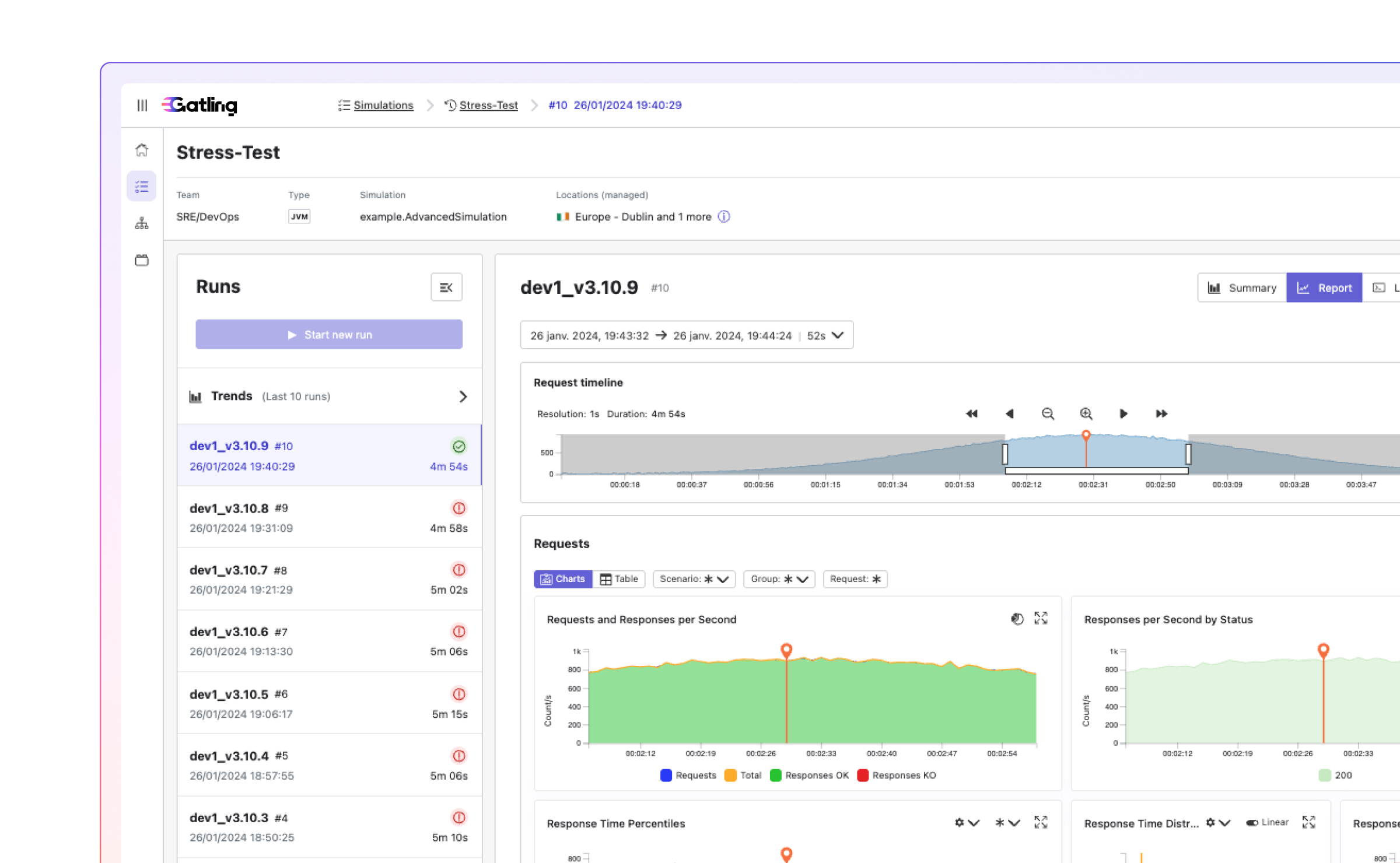
Open source core and enterprise platform
The free Community Edition runs tests locally and generates HTML reports. Gatling Enterprise adds managed cloud infrastructure, team collaboration, advanced analytics, and governance controls for organizations testing at scale.
Supported languages and SDKs
You pick the language that fits your team:
- Java: Most common for enterprise teams
- Scala: The original Gatling DSL
- Kotlin: Modern JVM option with clean syntax
- JavaScript/TypeScript: Familiar for frontend-heavy teams
Modern protocol coverage
Gatling covers what modern applications actually use: HTTP/HTTPS, WebSocket, gRPC, GraphQL, Kafka, MQTT, JMS, SSE, and JDBC. If you're building microservices or event-driven systems, the protocols you care about are already supported.
What is LoadRunner
LoadRunner, now called OpenText LoadRunner Professional, has been around for over twenty years. It's an enterprise performance testing platform built for large organizations with dedicated QA teams and complex application landscapes that often include legacy systems.
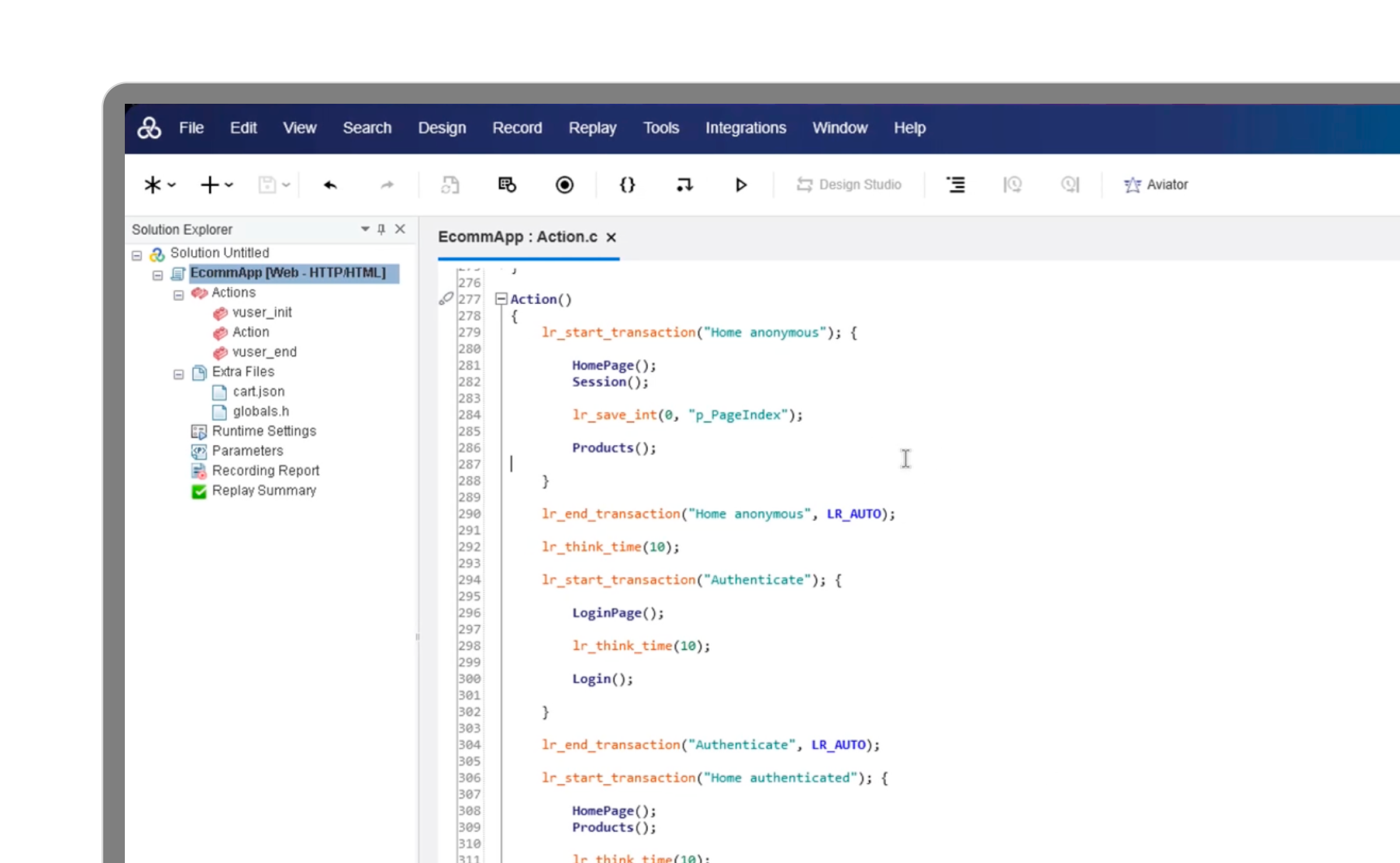
Enterprise performance testing platform
LoadRunner packages script creation, load generation, and results analysis into one proprietary ecosystem. With 55% of organizations citing vendor lock-in avoidance as a growing priority, the platform's proprietary approach requires significant investment in licensing, infrastructure, and specialized training.
VuGen scripting environment
Virtual User Generator (VuGen) is LoadRunner's script creation tool. You record user interactions through a GUI, and VuGen generates scripts in proprietary languages. The approach feels accessible at first, though the generated code can become difficult to maintain as your test suite grows.
Supported protocols
LoadRunner's protocol list is extensive, especially for legacy systems. SAP GUI, Citrix, mainframe terminals, and dozens of enterprise protocols that most modern tools don't touch. That breadth comes with complexity—each protocol often requires specific configuration and expertise.
Test scripting and creation
How you create tests affects how quickly your team moves and whether your test suite stays maintainable over time. This is where Gatling and LoadRunner differ most.
Code-first testing in Gatling
With Gatling, you write tests in your IDE using plain code with no proprietary concepts to learn. You get autocomplete, refactoring, compile-time error checking, and all the developer tooling you already use. Tests go through code review like any other code change, and development teams can own and run tests independently, no specialist standing between the data and the decision.
GUI-based scripting in LoadRunner
VuGen uses point-and-click recording to generate scripts. The initial experience feels approachable, though teams often find that generated scripts require significant cleanup. As test suites grow, maintenance becomes increasingly time-consuming.
Recording and import capabilities
Both tools offer ways to speed up test creation:
- Gatling: HTTP Recorder, HAR file import, Postman collection import, Gatling Studio for browser recording that exports clean Java code
- LoadRunner: VuGen recording with protocol-specific configurations and correlation rules
Version control integration
Gatling tests are plain text files. They diff cleanly, review naturally in pull requests, and track history like any source code. LoadRunner scripts include binary components and proprietary formats that make version control awkward.
Supported protocols and API technologies
Protocol support determines what you can actually test. Your technology stack drives the right choice here.
Web and REST API support
Both tools handle HTTP/HTTPS well. Gatling includes native support for GraphQL and modern REST patterns, with built-in parsing for JSON and XML using JSONPath, XPath, and JMESPath expressions.
Messaging and event streaming
For Kafka, JMS, and MQTT, Gatling provides native plugins that integrate directly into test scenarios. LoadRunner supports messaging protocols, though often through additional modules or extensions.
Database and legacy system testing
LoadRunner has a clear edge for legacy protocols like SAP GUI, Citrix, and mainframe terminals. If your organization depends heavily on these systems, that protocol breadth matters. Gatling covers JDBC for database testing but doesn't target legacy enterprise protocols.
CI/CD pipeline integration
Teams that run performance tests on every commit catch problems early. With over 72% of DevOps pipelines now integrating automated performance testing, pipeline integration ease is critical. It often determines whether continuous performance testing actually happens or remains a periodic manual task.
Build tool and plugin support
Gatling provides native plugins for common development tools:
- Maven, Gradle, sbt: Direct plugin integration for JVM projects
- npm: Direct plugin integration for JavaScript/TypeScript projects
- Jenkins, GitHub Actions, GitLab CI, TeamCity, Buildkite: Official plugins for CI/CD pipelines
Pipeline automation features
Gatling tests return pass/fail results based on assertions you define—response time thresholds, error rates, throughput targets. Failed assertions can block deployments automatically. Gatling Enterprise adds automated stop criteria to prevent runaway tests from wasting resources.
Infrastructure as Code compatibility
Gatling Enterprise integrates with Terraform, Helm, AWS CloudFormation, and AWS CDK. You can provision load testing infrastructure alongside application infrastructure, all version-controlled and repeatable.
AI capabilities
AI readiness is increasingly a differentiator, and it's an area where the two tools diverge sharply. Gatling offers a set of AI features built to meet engineers where they already work; LoadRunner currently offers none of these.
- MCP server integration for IDE-native, AI pair-programming workflows
- Automated run summaries and AI analysis & insights
- Continuous Performance Intelligence, a continuous performance record across every release
- AI-powered documentation and the ability to load-test LLMs and AI apps
- A LoadRunner Migration Assistant that converts existing VuGen coverage
SLOs and compliance scoring
Define your response time and error rate targets once, and every Gatling run returns a compliance score in a precise percentage engineering leadership can track across every release, with no specialist needed to interpret the output. Regressions surface before production, not after. Gatling also offers an SLO advisor tool to help you choose the right SLOs for your service.
Scalability and distributed load generation
Realistic load testing often requires distributed infrastructure across multiple geographic regions.
Cloud and managed infrastructure
Gatling Enterprise provides fully managed load generators across public cloud regions. You select target regions, and Gatling handles provisioning, scaling, and teardown. LoadRunner offers LoadRunner Cloud as a managed option, though many organizations still run self-managed infrastructure.
On-premises and private deployment
Both tools support on-premises deployment. Gatling's private locations use outbound-only connections, which simplifies firewall configuration for security-sensitive environments.
Resource efficiency comparison
Gatling's asynchronous, non-blocking architecture simulates more virtual users per machine than LoadRunner's thread-per-user model. That efficiency translates directly to lower infrastructure costs for equivalent load.
Reporting and performance analytics
Running tests is only half the job. Understanding results is where you actually find problems.
Real-time monitoring dashboards
Gatling Enterprise shows live dashboards during test execution with full-resolution data capture—no sampling, even at high request volumes. LoadRunner's Analysis module provides detailed post-test analysis, though real-time visibility varies by configuration.
Historical trend analysis
Gatling Enterprise enables comparison of test runs across time periods, helping teams spot performance regressions before they reach production. Configurable data retention policies balance storage costs with historical visibility.
Data export and observability integration
- Gatling: Native streaming to Datadog and Dynatrace, plus PDF and CSV exports
- LoadRunner: APM tool integration typically requires additional configuration
Pricing and total cost of ownership
Licensing models affect both initial adoption and long-term costs.
Open source vs proprietary licensing
Gatling's open-source Community Edition is free with no user limits. Gatling Enterprise pricing scales with usage. LoadRunner uses seat-based enterprise licensing.
Infrastructure and operational costs
Gatling's resource efficiency means lower cloud spend for equivalent load generation. Teams often run larger tests on smaller infrastructure compared to LoadRunner deployments.
Hidden costs and long-term value
LoadRunner frequently requires dedicated specialists due to its complexity and proprietary scripting. Gatling's code-first approach lets existing developers write and maintain tests without specialized training.
Ready to see the difference? Request a demo to explore how Gatling Enterprise fits your workflow.
Enterprise collaboration and governance features
Organizations with multiple teams benefit from centralized collaboration capabilities.
Role-based access and permissions
Gatling Enterprise provides RBAC, SSO integration (SAML, OIDC), and quota management. LoadRunner offers enterprise access controls through its administrative console.
Team workspaces and result sharing
Gatling centralizes tests, results, and infrastructure configuration in shareable workspaces. Annotated reports and public links make sharing findings with stakeholders straightforward.
Compliance and security controls
Both platforms offer audit trails and access logging. Gatling Enterprise provides dedicated IP options for testing through strict firewalls, plus configurable data retention policies.
Carrying LoadRunner coverage forward
Your VuGen scripts encode years of domain knowledge — transaction logic, runtime configuration, parameter files, and correlation rules. Gatling's Migration Assistant reads all of it and converts it faithfully: runtime settings become Gatling protocol config, parameters become feeders, and transactions become named requests or groups. The workflow changes; the coverage doesn't.
Learning curve and getting started
Time-to-first-test matters when evaluating tools.
Documentation and tutorials
Gatling's documentation includes getting-started guides, API references, and Gatling Academy courses. LoadRunner's documentation is comprehensive but reflects the platform's complexity.
Community and open source ecosystem
Gatling's open-source community contributes plugins, shares examples on GitHub, and answers questions in forums. LoadRunner's support model is vendor-controlled, with more limited community resources.
How to choose: Gatling vs LoadRunner for your team
Your choice depends on your team's skills, technology stack, and organizational context:
- Choose Gatling if: You want test-as-code workflows, native CI/CD integration, modern protocol support, and cost efficiency
- Choose LoadRunner if: You have significant legacy protocol requirements, existing LoadRunner expertise, or enterprise procurement constraints
Where performance testing is heading
The deciding factor between these tools isn't a feature checklist, it's where your engineering organization is going. Performance testing is steadily moving out of a pre-release phase owned by specialists and into the build pipeline, where it runs on every commit and surfaces regressions before they reach production. That shift rewards tools developers can own directly, that version alongside application code, and that return a clear signal or a pass/fail gate or a compliance score without a specialist needed to interpret it.
LoadRunner still earns its place where that movement hasn't reached: deep legacy protocol estates, established Centers of Excellence, and procurement structures built around proprietary enterprise platforms. Those constraints are real, and the years of domain knowledge encoded in existing VuGen coverage are worth preserving. Gatling's Migration Assistant exists precisely so that coverage carries forward rather than getting rebuilt from scratch.
For teams whose center of gravity is shifting toward continuous delivery, cloud-native architectures, and AI-assisted workflows, the trajectory points toward code-first, pipeline-native testing. The question worth asking isn't which tool is better in the abstract, but which one matches how your team will be working two years from now — and how much of what you've already built can come along for the ride.
FAQ
FAQ
Can I migrate existing LoadRunner scripts to Gatling?
The tools use fundamentally different scripting approaches, but Gatling's Migration Assistant can transform your existing VuGen scripts into working Gatling simulations — converting runtime settings to protocol config, parameters to feeders, and transactions to named requests or groups. Many teams find that the resulting tests are cleaner and more maintainable.
Which load testing tool requires fewer hardware resources?
Gatling's asynchronous architecture uses significantly fewer resources per virtual user — roughly 10–20× more efficient at equivalent load — allowing teams to generate more load from the same infrastructure.
Does Gatling support enterprise-scale load testing?
Yes. Gatling Enterprise provides fully managed distributed load generation, team collaboration, advanced analytics with full-resolution data capture, and governance controls for large-scale testing programs.
Is LoadRunner still relevant for modern performance testing?
LoadRunner remains relevant for organizations with legacy system dependencies or substantial existing investments. With open-source testing tools growing at 15.22% CAGR, teams building modern cloud-native applications increasingly favor code-first tools like Gatling that integrate naturally with DevOps workflows.

Related articles


Ready to move beyond local tests?
Start building a performance strategy that scales with your business.
Need technical references and tutorials?
Minimal features, for local use only
