
Table of contents
Using AI in performance testing with Gatling



Last updated on
Thursday
September
2026
How Gatling uses AI to support performance tests
AI is showing up everywhere in software testing. Scripts get generated faster. Results get summarized automatically. Dashboards promise insights without effort.
But performance testing isn’t like unit tests or linters.
When systems fail under load, teams need to know what was tested, how traffic was applied, and why behavior changed. That’s why many engineers are skeptical of AI in performance testing, not because
AI is useless, but because black-box automation erodes trust where it matters most.
TL;DR: AI can help performance testing, but only if teams stay in control.
This article looks at where AI genuinely helps in performance testing, where it doesn’t, and how teams can adopt AI-assisted tools without giving up control, explainability, or engineering judgment. It also explains Gatling’s approach: using AI to reduce friction and speed up decisions, while keeping performance testing deterministic and test-as-code.
Addressing resistance to AI testing tools
So, if AI is taking the world by storm, why don’t all developers use AI performance testing yet?
- Some fear the loss of control or transparency
- Others distrust black-box models for critical systems
- Legacy workflows may not adapt easily
How teams overcome this resistance:
- Use tools that explain what the AI did and why
- Let developers override, fine-tune, or approve AI suggestions
- Start by augmenting existing test scripts instead of replacing them
However, in practice, skepticism often fades once teams see AI reduce manual setup work and free time for investigating real performance issues without taking ownership away from engineers.
How Gatling approaches AI-assisted performance testing
AI is changing how teams design and analyze performance tests under load. Gatling’s approach is to help teams reason about that behavior faster, without turning performance testing into a black box.
Instead of auto-generating opaque tests or hiding execution logic behind models, Gatling keeps performance testing deterministic, explainable, and code-driven—with AI acting as a companion, not a replacement for engineering judgment.
This matters more than ever for modern systems.
AI assistance without losing test-as-code control
At the core of Gatling is a test-as-code engine trusted by thousands of engineering teams. Simulations are written as code, versioned, reviewed, and automated like any other production artifact.
Gatling’s AI capabilities are designed to reduce friction around that workflow, not replace it. In practice, this means:
- Using AI inside the IDE to scaffold or adapt simulations faster
- Generating a first working baseline from API definitions or existing scripts, which engineers can then refine
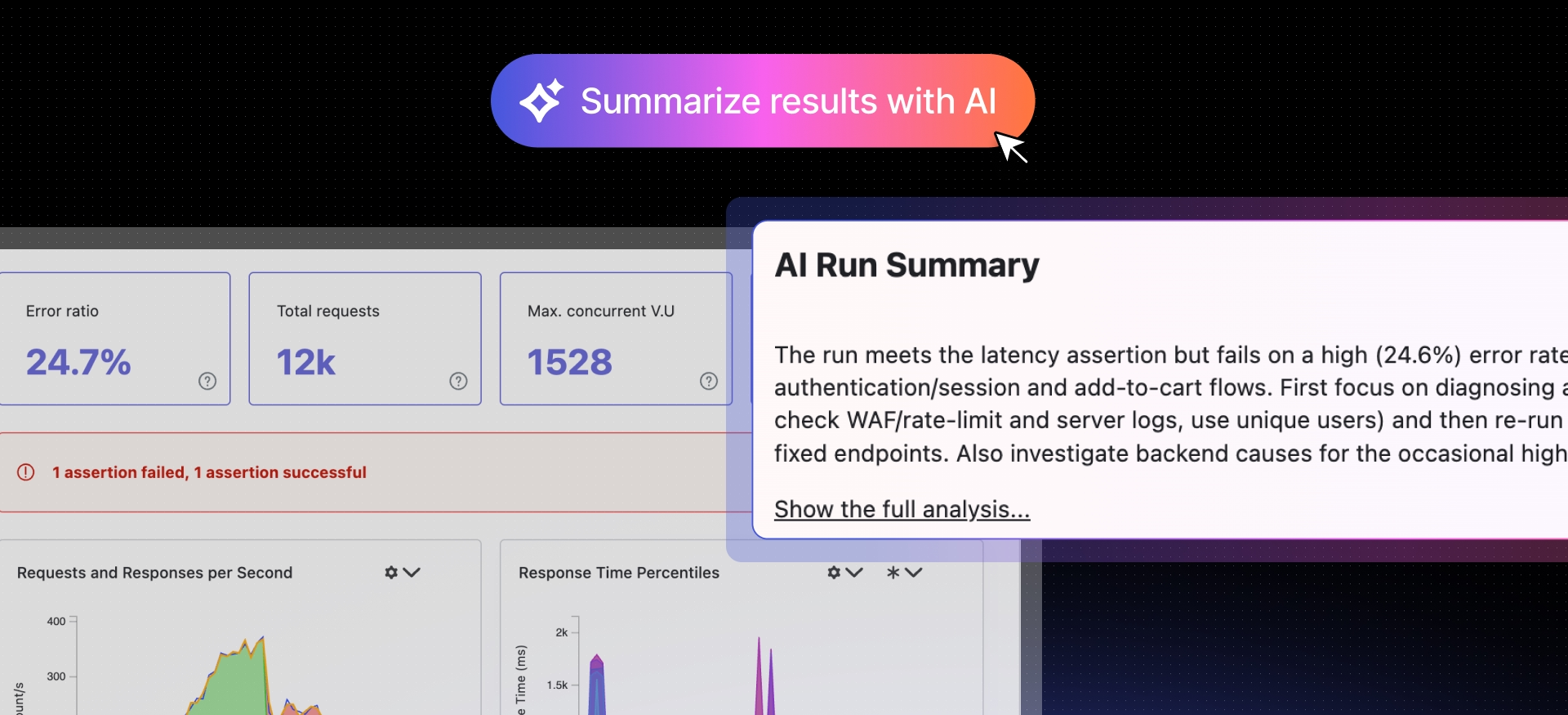
- Helping explain test results and highlight meaningful patterns across runs
- Keeping every request, assertion, and data flow fully visible and reviewable
Engineers always own the final simulation.
Gatling does not use AI to hide logic or auto-run tests autonomously. AI assists with creation and interpretation, while execution remains deterministic and transparent, especially when tests are automated through CI/CD workflows.
Faster test creation, grounded in real workflows
Performance tests often lag behind development because they are expensive to create and maintain. Gatling reduces that cost by meeting teams where they already work.
Teams can:
- Generate or adapt simulations using natural language prompts inside their IDE
- Import Postman collections to bootstrap API load tests
- Evolve tests alongside application code instead of rewriting them after changes
The goal is not “one-click testing.” It’s starting from a solid baseline instead of a blank file, then letting engineers refine behavior, data, and assertions.
This approach scales across teams because it aligns with existing development practices, not separate QA tooling.
Insight-driven analysis, not dashboard fatigue
Most performance tools provide charts. Few help teams understand what actually changed.
Gatling Enterprise Edition focuses on comparative analysis and signal clarity, especially in continuous testing setups.
Teams can:
- Compare test runs to spot regressions across builds
- Track performance trends over time
- Correlate response times, error rates, and throughput
- Share interactive reports across Dev, QA, and SRE teams
AI-assisted analysis helps highlight patterns and summarize results, but engineers always have access to the underlying metrics and raw data.
This makes performance testing usable at scale—not just during one-off load campaigns.
Performance tests as deployment gates in CI/CD
In modern delivery pipelines, performance testing only creates value if it influences decisions.
Gatling Enterprise Edition integrates directly into CI/CD pipelines, allowing teams to:
- Run performance tests automatically on commits or deployments
- Define assertions tied to SLAs or SLOs
- Fail pipelines when regressions are detected
- Compare results against previous successful runs
This shifts performance testing from “validation after the fact” to continuous risk control.
AI assistance helps interpret results faster, but pass/fail logic remains explicit and auditable.
{{cta}}
Remember, AI doesn’t replace performance engineering
AI won’t fix performance problems on its own.
What it can do is remove friction: help teams create tests faster, interpret results more clearly, and focus attention where performance risk actually lives. But for performance testing to reduce risk, it still has to be explicit, explainable, and owned by engineers.
That’s the line Gatling draws.
By keeping execution deterministic and visible, while using AI to assist with setup and analysis, teams can adopt AI without turning performance testing into a black box. The result isn’t “testing by AI.” It’s performance engineering that scales without losing trust.
If you’re exploring how AI fits into your performance testing strategy, start small. Use AI to accelerate the parts that slow you down today, and keep humans in control of the decisions that matter most—with Gatling Enterprise Edition when you’re ready to scale.
{{card}}
{{author-bio}}
About the author
FAQ
FAQ
How is AI used in performance testing today?
AI is used to assist performance testing workflows, not to replace them. Teams use AI to help create test scripts faster, understand test results more easily, and focus on meaningful changes between runs. The load tests themselves still run deterministically using test-as-code. AI supports engineers; it does not control execution.
Does AI performance testing mean tests run automatically without engineers?
No. AI performance testing does not mean autonomous testing. Engineers still design scenarios, define load models, and set pass or fail criteria. AI helps with setup and analysis, but humans remain responsible for decisions and outcomes. This keeps performance testing explainable and auditable.
Why don’t more teams fully trust AI for performance testing?
Many engineers are cautious because performance testing directly impacts production reliability. Black-box AI tools can make it unclear what was tested or why results changed. Teams are more likely to trust AI when it explains its suggestions, allows overrides, and keeps test execution deterministic.
What’s the safest way to start using AI in performance testing?
The safest approach is to start small. Use AI to scaffold test scripts, adapt existing tests, or summarize test results, while keeping tests versioned and reviewed like any other code. Integrating AI-assisted testing into CI/CD pipelines helps teams move faster without losing control or transparency.
Related articles

Ready to move beyond local tests?
Start building a performance strategy that scales with your business.
Need technical references and tutorials?
Minimal features, for local use only
